Friday, December 13, 2013

My son's first short story in 5th grade

Here is Gavin's short story he wrote for the Creative Writing Contest.  It is all totally his thoughts and words.  The contest asked for a piece that is less than 800 words.  This one was just over a thousand words so we had to edit it.  Enjoy his unedited version.  He even put in one of our ancestors into his story.  It is his attempt at historical fiction.  I loved it.  I hope he keeps up his writing. Enjoy!


Tuesday, November 5, 2013

iPad Cart Training 11-8-13


Problems with that pesky wireless signal.  Try Airdrop which uses bluetooth sharing between iPads. See the video below to watch it in action.


Explain Everything:  Recording voice and demonstrating work at the same time. See video below.


Some of the sites you can click from your iPad:

KidBlog

HistoryPin Tour

CCA Poll Everywhere

Educreations

Saturday, April 13, 2013

Monday, February 11, 2013

4th Grade Writing Prompt:


4th Grade Writing Prompt


If you were sent back in time to the colonial period what would 

you do or say? 


What kinds of places would you visit?


Who would  you want to talk to and what would you ask them?


Would you change anything about that time?


If you could bring one thing from our time back to the colonial period what would it be?


How would you get from place to place?


Tuesday, January 22, 2013

Extreme Makeover: Computer Lab Edition

Our new iMac lab went in this weekend!!!!

Before:


After:


Hooray for the Information Systems Team of Jonathan, Kent, and Eddie!!!

Thursday, May 10, 2012

iPads in the classroom

Here are some websites on how some schools are using iPads in the classroom.  I will update these as I find more and more.  It looks like it could help you tell what they can be used for and how it works in your lesson plans.
#1 iPad website

Sunday, November 6, 2011

Finding iPod Apps for Review in the App Store

App Store on computer: http://itunes.apple.com/us/genre/ios/id36?mt=8
-or-
Try this which shows how iPods can be used in education:   http://www.apple.com/education/ipodtouch-iphone/
-or-
This app store is for iPods:
http://www.apple.com/ipodtouch/from-the-app-store/
-or-
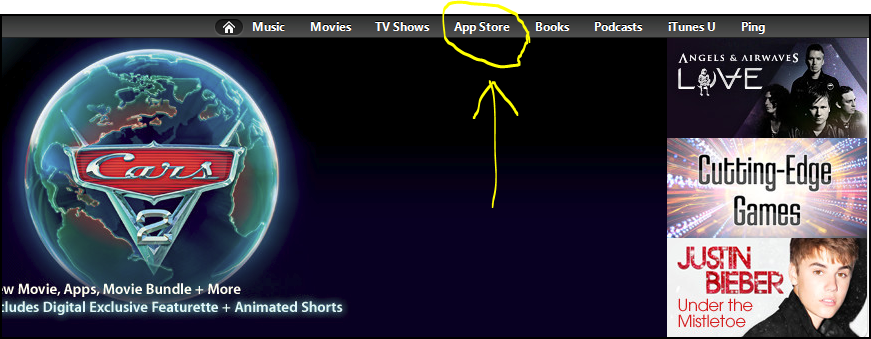
1.) Open iTunes
2.) Find the iTunes Store link on the left under store
3.) Choose App Store at the top of the window.
4.) Scroll down a little and find the education link and click it.

5.) You can browse from there. Some of the quick links on the right might get you to places you want to go like apps for teachers or special education. (iPhone Apps are usually interchangeable with iPod touch apps.)

Blessings,
The Tuckers

Sunday, September 11, 2011

Apple Bites

Take a bite out of your Apple with some of these helpful tips/tricks.


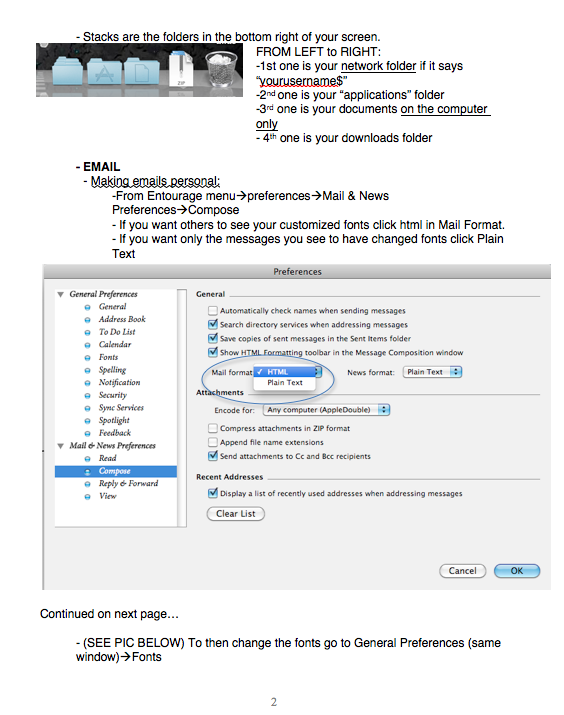
Important Keystrokes:

-Force Quit a Program that is not responding (command+option+esc)

-Quit a Program and all its windows:  (command+Q)

-Home Key:  (command+left arrow)
-End Key:  (command+right arrow)
-Start of a document: (fn+option+left arrow)
-End of document: (fn+option+right arrow)
-Copy:  (command+C)
-Paste: (command+V)
-Undo: (command+Z)
-Backspace: (delete key)­
-Delete to right: (fn+delete)
-Page Up:  (fn+up arrow)
-Page Down:  (fn+down arrow)
-Increase or decrease font size: (command and +) (command and -)­­­­­­


EXTRA:

-Take a full-screen shot: (command+shift+3) the picture appears on your desktop

-Take a partial-screen shot:  (command+shift+4)

-Remember the size of your window next time it opens: (hold command while resizing a window)

-Opening dictionary [doesn’t work in Office]:  with cursor on word press (command+ctrl+D)


VIDEOS:

*Using Finder


*PC to MAC

*Anatomy of a Mac


Thursday, September 8, 2011

eInstruction Interwrite Workspace

Teachers,

It's time to learn something new!!!

Something that will stretch your thinking and at first add an extra and different work load to your teaching.  Something that can bring a fresh new look or perspective to a worn out lesson.  This something is the Interactive Interwrite Projector and Workspace.


By no means will it transform you into SuperTeacher or help you make a student learn better.  Your teaching qualities you and God have honed since that first teaching year where you learned more than the kids is what will make things better.  We are just going to be provided a tool that brings a "techno slant" focus to your lesson.  Maybe students will pay more attention.  Maybe they won't.  In fact there may be a student who will find ways to not like it.

What you decide to do with it is what will make it gel with your lessons.  If you are excited, as Roxane showed us with her history presentation during devotions, your class will be excited.  It could be as regular as a Friday quiz on your whiteboard using the curtain or spotlight.  Or it could be using pictures, video, or an interactive website to enhance your learning.


1.)Online Community

2.)Online Training Videos

3.)Magnetic Poetry

4.)Virtual Knee Surgery

5.)Google Sketchup - 3D drawing and rendering

6.)Word Concept Map

7.)Interactive Word Web

8.)Making a sketch that lasts

9.)Math Activities Online

10.)Time Toast - Interactive Timeline

VIDEO SECTION:
BELOW:
Quick Intro on what your interactive projector is going to allow you to do.


BELOW:
Inserting text into your slideshow on the fly.


BELOW:
Toolbar Settings


BELOW:

Attributes of each tool


BELOW:
Shapes and Attributes


BELOW:
Saving, Printing, and Exporting